
You Are Reaching AI Limits Too Fast. It Might Not Be Your Plan.
Most AI usage limits disappear faster because of messy context, broad prompts, huge logs, and long chats.
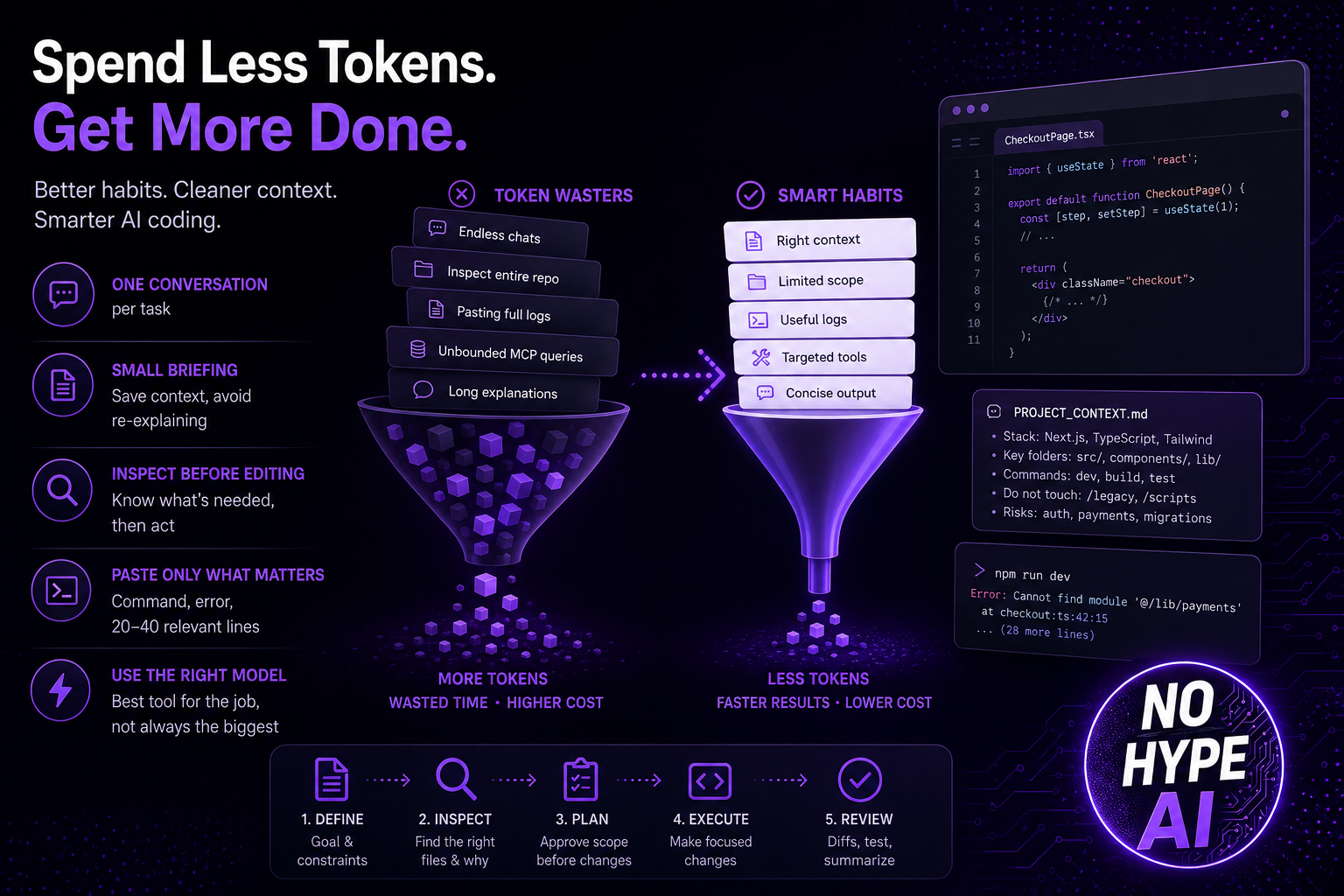
Hitting AI limits feels like you need to upgrade your subscription. Most of the time the real problem is simpler and more uncomfortable: you are the problem.
If you use ChatGPT, Codex, Claude, Claude Code, or any other coding agent seriously, your usage is not limited to the number of messages you send. The system also processes previous conversation history, files, logs, tool output, repository context, and the answer it generates back to you. One short-looking request can become a heavy task very quickly.
The simple version: tokens are the workload
A token is a small unit of text that an AI model reads or writes. It can be a word, part of a word, punctuation, code, or formatting. You see a message. The model sees input tokens, output tokens, cached input, and sometimes extra context from tools.
| Human view | Model view | Why it matters |
|---|---|---|
| Read this file | Thousands of input tokens | Files are not free context. |
| Check everything | Open-ended exploration | The agent may read far more than needed. |
| Continue after a long session | Old context may still be included | Old decisions can keep costing you. |
| Long final explanation | Output tokens | Generated text is part of the bill or usage pressure. |
Pricing snapshot: output is the expensive part
Pricing changes often, so treat this as a snapshot checked on May 2026 against official provider pages.
| Provider | Model | Input | Cached input | Output |
|---|---|---|---|---|
| OpenAI API | GPT-5.5 | $5.00 / 1M | $0.50 / 1M | $30.00 / 1M |
| OpenAI API | GPT-5.4 | $2.50 / 1M | $0.25 / 1M | $15.00 / 1M |
| Codex flexible credits | GPT-5.5 | 125 credits / 1M | 12.50 credits / 1M | 750 credits / 1M |
| Claude API | Sonnet 4.5 | $3.00 / 1M | $0.30 cache read / 1M | $15.00 / 1M |
| Claude API | Haiku 4.5 | $1.00 / 1M | $0.10 cache read / 1M | $5.00 / 1M |
The table tells a boring but useful story: output costs much more than input. But in coding agents, input can also become massive because the agent keeps feeding files, command output, prior context, and tool results back into the model.
The bigger issue: context pollution
Context pollution happens when your conversation fills up with information the model no longer needs. Old plans, old errors, old diffs, previous tool output, and abandoned directions all stay close enough to influence the next answer.
Large context windows are useful. They are not a strategy. They are a safety net for when a task really needs a lot of history.
| Pattern | Why it wastes usage | Better behavior |
|---|---|---|
| One endless chat | Old decisions leak into new tasks. | Use one conversation per task. |
| Inspect the whole repo | The agent reads broadly before it understands the problem. | Start with likely files and ask it to justify more. |
| Pasting full logs | Most log lines are irrelevant. | Paste the command, expected result, actual error, and 20 to 40 useful lines. |
| Unbounded MCP queries | Tool output becomes context. | Ask for counts, filtered rows, or exact IDs first. |
A practical token-saving workflow
1. Start new conversation more often
User one conversaiton per task. When the task is done, stop. Start a fresh session with a short summary.
2. Create a small project briefing file
A short PROJECT_CONTEXT.md can save repeated explanation. Keep it boring: stack, important folders, local commands, deployment notes, what not to touch, and known risks. Do not turn it into a diary.
3. Ask the agent to inspect before editing
First ask for the files it needs and why. Approve the scope before implementation (equivalent to the "plan mode" if you use Codex).
4. Limit file scope manuallly
Give the agent likely files and folders. Do not let it wander unless it explains why. Name the file, the screen, the function you want the agent to work on to give a more specific scope.
5. Paste only usefull logs
Provide the command, expected result, actual error, and 20-40 relevant lines.
6. Use cheaper model for simple work
Choose the stronger models for architecture, debugging, security, and final reviews. Most of yur work can be done with lower models and can save you many tokens.
7. Be careful with MCP
MCP can reduce token usage when it retrieves precise data. It can also explode cost if it returns everything. Enable only the needed MCP for your work and avoid enabling all MCP all the time.
8. Ask for diffs, not essays
Request files changed, why, risks, and how to test. Skip long explanations unless you need them.
For Claude Code you can also setup skills to reduce your token consumptions. Many solutions are availale, just ask your favorte LLM..
Prompt patterns that save tokens
First inspect only the files needed for this task.
Do not edit yet.
Tell me which files you need to change and why.
First inspect only the files needed for this task. Do not edit yet. Tell me which files you need to change and why.
The bug is in the checkout flow.
Start with these files:
- src/checkout/CheckoutPage.tsx
- src/checkout/payment.ts
- src/api/orders.ts

Do not inspect unrelated folders unless necessary.
Keep the explanation short.
Show only:
1. Files changed
2. Why
3. Any risk
4. How to test
Summarize the current state in less than 200 words:
- What was changed
- What remains
- Important files
- Known risks
A free test you can run today
Take one real task and run it twice. First, use the old messy conversation with all history still inside. Second, start fresh with a 200-word brief, exact goal, relevant files, and constraints. Compare follow-up count, wrong assumptions, answer length, and time to useful result.
If the clean run is faster or needs fewer corrections, your first upgrade is not a bigger subscription. It is better context control.
For example, create a simple HTML dashboard page based on your last chat conversation.
a. Prompt "create an HTML "about" page based on [YOUR PROJECT] in the last conversation (with many context and history).
b. Prompt "create an HTML "about" page based on [YOUR PROJECT] in a new conversation, giving a 2 sentences context on what your project is about.
Should you upgrade?
Heavy users do need higher limits. If you work in large repos daily, run long agentic coding sessions, or rely on advanced models for real business work, a higher plan can be rational.
But upgrade after you fix the obvious leaks. If you are pasting huge logs, keeping one endless chat, asking agents to inspect everything, and using top models for small tasks, a bigger plan will mostly let you waste more.
No Hype AI take
When hitting your limit, think about what you did and how you did it before thinking about upgrading your subscription.
Apply our advices to make your usage more meaningful and cheaper.
That is how you get more value. Not by sending more but by sending better.